Reporting and JSON Export
Exosphere includes a comprehensive reporting system that allows you to generate detailed reports of your inventory status and system updates in multiple formats.
This functionality does not require any connectivity or live access to hosts and operates entirely from the Cache, allowing reports or json to be exported on a schedule or from a different context where your ssh agent is not available.
The only requirement is read access to the exosphere cache database. (See Managing Cache for more details.)
Available Formats
Below are examples of each output format to help you choose the right one for your needs.
Styled with a visually appealing design, entirely self-contained in a single file. Suitable for reading or printing. Offers an optional quick navigation box to jump between hosts.
Recommended for most uses.
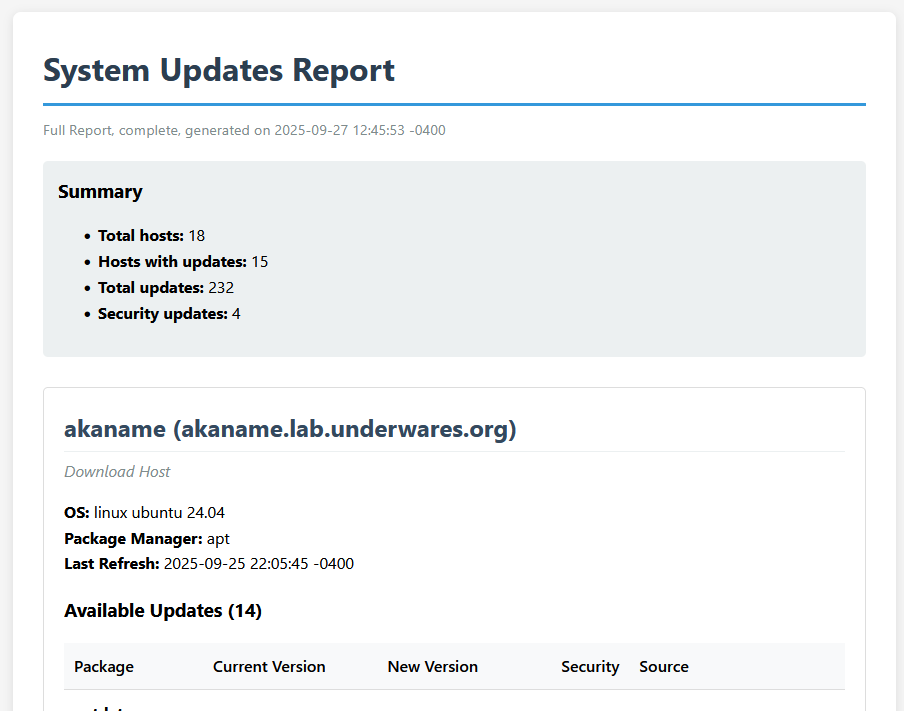
Partial screenshot of the html report, without navigation
📁 Sample Reports:
Full Report- Complete inventory with all hostsNo Navigation- Without quick navigation menuFiltered Report- Specific hosts selectionSecurity Updates Only- Only security-related updatesUpdates Only- Only hosts with available updates
Useful for quick overviews or for environments where rich text is not supported. If you want a cron job that sends an email, don’t worry, we got you.
=====================
SYSTEM UPDATES REPORT
=====================

Full Report, complete, generated: 2025-09-29 22:59:04 -0400

Summary:

  Total hosts: 5
  Hosts with updates: 4
  Total updates: 11
  Security updates: 4

web-prod-01 (10.0.1.10)
-----------------------
Web Server

  System: linux ubuntu 22.04
  Package Manager: apt
  Last Refresh: 2025-09-29 20:59:03 -0400

  Updates (4):

    Security Updates (2):
    - apache2: 2.4.52-1ubuntu4.6 -> 2.4.52-1ubuntu4.7
      Source: security
    - php8.1: 8.1.2-1ubuntu2.13 -> 8.1.2-1ubuntu2.14
      Source: security
📁 Sample Reports:
Full Report- Complete inventory, text formatFiltered Report- Selected hosts onlyUpdates Only- Hosts with updates availableSecurity Updates Only- Security updates only
Made available mostly as a lightweight intermediate format, since they can be rendered to a variety of other formats while providing support for tables. They can also be fed directly into any other tool that supports markdown.
# System Updates Report

Full Report, complete, generated on 2025-09-29 22:59:04 -0400

- **Total hosts:** 5
- **Hosts with updates:** 4
- **Total updates:** 11
- **Security updates:** 4

## web-prod-01 (10.0.1.10)

**System Information:**

- **Description**: Web Server
- **OS**: linux ubuntu 22.04
- **Package Manager**: apt
- **Last Refresh**: 2025-09-29 20:59:03 -0400

**Available Updates (4):**

| Package | Current Version | New Version | Sec | Source |
|---------|-----------------|-------------|-----|--------|
| **apache2** | 2.4.52-1ubuntu4.6 | 2.4.52-1ubuntu4.7 | **Yes** | security |
| **php8.1** | 8.1.2-1ubuntu2.13 | 8.1.2-1ubuntu2.14 | **Yes** | security |
| **curl** | 7.81.0-1ubuntu1.10 | 7.81.0-1ubuntu1.13 | No | updates |
📁 Sample Reports:
Full Report- Complete inventory, markdown formatFiltered Report- Selected hosts onlyUpdates Only- Hosts with updates availableSecurity Updates Only- Security updates only
Available for integration with other tools, implementation of which is left as an exercise for the reader. It is also useful for displaying the raw internal state of the inventory and hosts.
The downloadable examples below should give you a good idea of the structure.
For more details on the JSON schema, see the JSON Schema Details section below.
📁 Sample Reports:
Full Report- Complete JSON inventorySecurity Updates Only- Security updates in JSONUpdates Only- Available updates onlyFiltered Report- Selected hosts as JSON
Basic Usage
The simplest way to generate a report is:
$ exosphere report generate
This will output a plain text report to your terminal showing all hosts and their update status.
The --format/-f option controls the output format, and accepts any of text,
html, markdown, or json.
Save to File
You can save the report to a file with --output/-o:
$ exosphere report generate --format html --output systems-report.html
Displaying Specific Hosts
Which hosts are included in the report can be controlled by specifying them as arguments. For example, to generate a JSON report for just three hosts:
$ exosphere report generate --format json web1 web2 database
Updates Available Only
The report can filtered to only show hosts with updates available using
--updates-only:
$ exosphere report generate --updates-only --format html --output updates.html
Security Updates Only
To exclusively select security updates, use --security-updates-only:
$ exosphere report generate --security-updates-only
Advanced Options
File Output with Preview
Use
--teeto show the report in the terminal while also saving it to a file:$ exosphere report generate --format html --output report.html --tee
Quiet Mode
Suppress informational messages with
--quiet. Can be helpful in the context of scripts or cron jobs.$ exosphere report generate --format json --quiet --output daily-report.json
HTML Navigation
You can opt out of the quick navigation menu in HTML reports with
--no-navigation:$ exosphere report generate --format html --no-navigation -o report.html
Report Content
All reports include:
Host Information: Name, IP address, operating system details
Update Summary: Total updates available, security updates count
Update Details: Package names, versions, and security status
Metadata: Report generation time and scope information
The presentation and formatting varies by format, but the core information remains consistent across all output types.
Tip
For detailed information about all available options and flags,
see CLI Command Reference or run exosphere report generate --help.
JSON Schema Details
The JSON output format provides a structured representation of the inventory and update information, making it suitable for programmatic consumption.
If you want to have a Discord bot that reports updates, or feed your event queue for your astoundingly complex MQTT Doorbell Over Zigbee that also brews coffee, this should enable you to do so.
JSON Schema
The JSON output follows a well-defined schema for consistency and integration purposes.
The schema is available in the source tree as exosphere/schema/host-report.schema.json,
but is also made available here, corresponding to the version this documentation is built
for:
host-report.schema.json as of v2.2.1.dev0
Structure Overview
The report consists of an array of host objects. When generated via the CLI, the hosts will be pre-filtered to only include hosts that have been discovered, are supported, and have a valid package manager provider assigned to them.
Tip
Unless you are directly using the Python API (see Reporting Interfaces)
to generate reports, you can safely assume that all the hosts in the
report have been discovered, and will not have null values anywhere
other than last_refresh (if the host has never been refreshed).
Host Object Properties
Property |
Type |
Description |
|---|---|---|
name |
|
Host identifier/name |
description |
|
Optional user-provided description of the host. Omitted if not provided. |
ip |
|
IP address or FQDN of the host |
port |
|
SSH port number (Min: 1, Max: 65535) |
os |
|
Operating system family. null if not yet discovered. |
flavor |
|
OS distribution/flavor. null if not yet discovered. |
version |
|
OS version. null if not yet discovered. |
supported |
|
Whether this host type is supported by Exosphere |
online |
|
Whether the host was last reachable |
package_manager |
|
Package manager in use. null if not yet discovered or unsupported. |
updates |
|
List of available updates |
last_refresh |
|
ISO 8601 timestamp of last data refresh. null if never refreshed. (Format: date-time) |
Note
The description field will be omitted entirely if no description
was provided for the host in the configuration.
Each host’s updates array contains update objects with the following structure.
Update Object Properties
Property |
Type |
Description |
|---|---|---|
name |
|
Package name |
current_version |
|
Currently installed version. null for NEW packages or dependencies |
new_version |
|
Available version |
security |
|
Whether this is a security update |
source |
|
Update source/repository |
Note
The current_version field may be null whenever the package is a new
dependency. Interfaces in the Exosphere API usually translate this to the
string (NEW), but the raw JSON will have null in these cases.
[
  {
    "name": "web-server-01",
    "description": "Production web server",
    "ip": "192.168.1.10",
    "port": 22,
    "os": "linux",
    "flavor": "ubuntu",
    "version": "22.04",
    "supported": true,
    "online": true,
    "package_manager": "apt",
    "updates": [
      {
        "name": "curl",
        "current_version": "7.81.0-1ubuntu1.4",
        "new_version": "7.81.0-1ubuntu1.6",
        "security": true,
        "source": "security"
      },
      {
        "name": "new-dependency",
        "current_version": null,
        "new_version": "1.0.0",
        "security": false,
        "source": "main"
      }
    ],
    "last_refresh": "2024-03-15T14:30:00.000Z"
  },
  {
    "name": "database-server",
    "ip": "192.168.1.20",
    "port": 22,
    "os": "freebsd",
    "flavor": "freebsd",
    "version": "13.1-RELEASE",
    "supported": true,
    "online": true,
    "package_manager": "pkg",
    "updates": [],
    "last_refresh": null
  }
]
More examples are available in the Sample Reports section above.
Integration Examples
Here are some concrete but deeply uncreative examples of how the reporting feature can be used in practice.
If you make a cool thing, please let us know via a github issue! We’ll happily showcase it here.
Email text report about security updates
#!/bin/bash
exosphere report generate --updates-only --quiet \
| mail -s "System Updates Available" bigadmin@example.com
JSON Processing with jq
# Count hosts with security updates
exosphere report generate --format json --security-updates-only | jq 'length'

# Extract just host names and update counts
exosphere report generate --format json | jq '.[] | {name, updates: .updates | length}'

# The same but only hosts that have updates
exosphere report generate --format json \
| jq '.[] | select(.updates | length > 0) | {name, updates: .updates | length}'